How do I use my Clipper card?
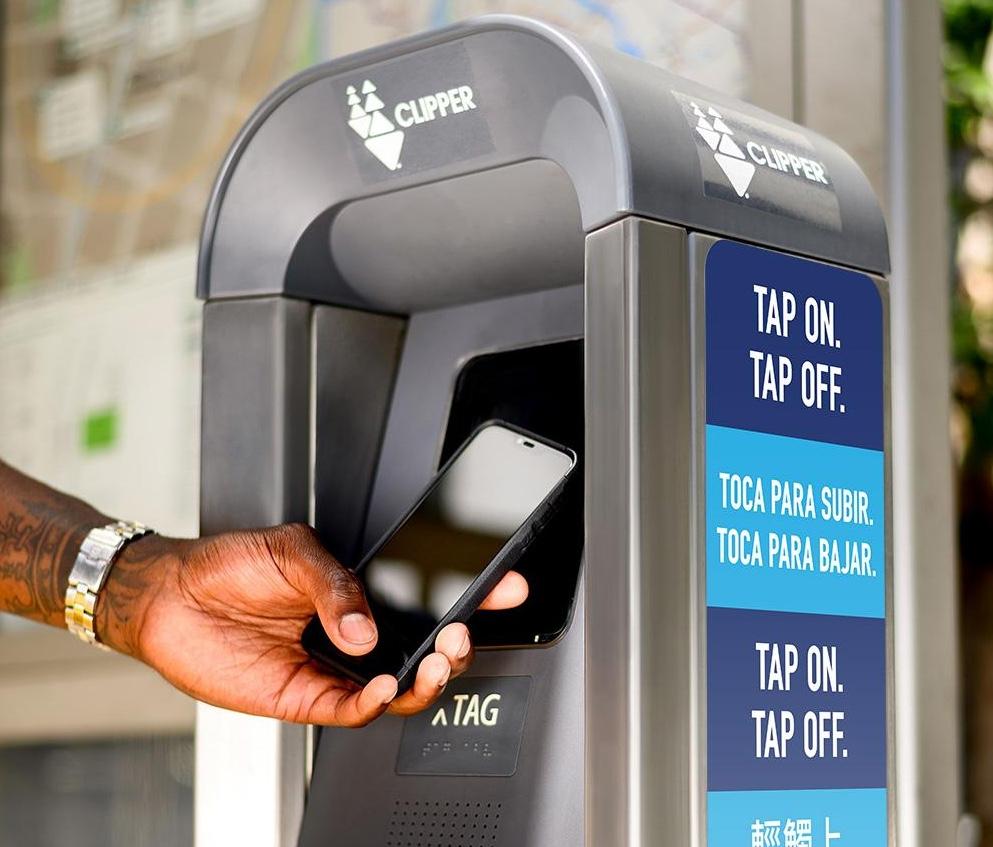
Each time you board the train, you must tap your card or smart device by holding it flat against the Clipper card validator screen on Caltrain's platform before boarding (Remember your first tap will load the GoPass to your card). You must tap your card again when you get off the train.
When tapping, be sure to hold the card or smart device for several seconds against the screen.
When you tap on for the first time the GoPass will load and the screen should state:
Clipper 1 system: "Travel Ok. Pass Used. Ok to Dec. 31. New Pass Added" (date may change depending on the participant loading schedule).
Next Generation Clipper system: “Travel Ok.”
Each time you tap on successfully, you should hear one “beep.”
Be sure to tap on Caltrain's platforms because if the card is tapped on another transit operator's card reader it won't show up as a valid tap on Caltrain's system.
Pay attention to the taps.
Clipper 1 Card users - If you tap twice within minutes, the second tap will void the first tap and you will not have a valid tap to ride.
Next Generation Clipper Card users - If you tap twice within 30 minutes, the second tap will void the first tap and you will not have a valid tap to ride.
In the meantime, if the card isn’t working, you must purchase a ticket from the station ticket machine because valid fare is required before boarding; otherwise you will be subject to citation for fare evasion.
Should I register my Adult Clipper card
It is recommended that you register your Clipper card at www.clippercard.com. It allows for easier Clipper account management, e.g. report lost card, view account information, check account balance, transaction/trip history, automatic reloading, etc. As it relates to the new Next Generation system, you’ll be able to monitor if your card has been upgraded to be compatible with the new system. If the card is not registered, you will not have access to the benefits mentioned above and would need to contact Clipper Customer Service for support.
What if I unable to register my Adult Clipper card on the website and app?
Please contact the Clipper Customer Service Center at 877.878.8883 or at custserv@clippercard.com. If you have a 10-digit card serial number, and the card has never been registered before, an agent will be able to assist you with that.
Do I need to purchase a new Adult Clipper card to use the new Next Generation Clipper system?
No. The current Clipper 1 cards will work in the new system as long as you tap your card before the system transition ends. We recommend tapping by the end of February.
What is the difference between the Clipper 1 cards and new Next Gen Clipper cards (Clipper 2)?
For physical cards, Clipper 1 cards have a 10-digit serial number and Clipper 2 physical cards will have a 19-digit serial number along with a CVV printed on it. For mobile cards, once the card moves into the new system, the mobile card will show a 19-digit serial number versus a 10-digit one when you look in your wallet or app. Note: 10-digit Clipper 1 physical cards will be transitioned to the new system and can continue to be used.
Does a Clipper 1 card keep its same 10-digit number after it migrates to the new Next Generation Clipper system?
Physical Clipper 1 cards will keep the same 10-digit card number when converted to the new system but mobile Clipper 1 cards are replaced with a 19-digit card number. All cards also are assigned a transit account number that registered customers can see in their accounts.
What is a Transit Account Number?
The Transit Account Number is the cloud-based account identifier and is automatically assigned to all Clipper card numbers (10 and 19-digits).
What if I don’t have an Adult Clipper card?
Please see your company GoPass administrator because each participating company manages this process at its discretion.
What if I’m under the age of 18 or a senior?
The GoPass may only be used on Adult Clipper cards, so you will need to use an Adult Clipper card. Be sure to obtain a separate Youth or Senior Clipper card if you plan to use it with cash value or passes from other transit agencies.
How does the GoPass load to the Clipper card?
The GoPass will load when tapping on the Clipper validator on Caltrain’s platform for the first trip. If you are using a card that is in the Next Generation Clipper system, the GoPass should automatically be in your account.
What if I forget to tap the Clipper card before boarding the train?
You will be subject to notice of violation, citation or fine because you must present valid fare on the train. It is a requirement that you tap on and off.
What if I forget to tap off at the destination station?
You should always tap on at the beginning of your trip and tap off at the end of the trip at all times when riding Caltrain to avoid notice of violation, citation or fine for non-valid fare when the conductor or enforcement personnel perform fare check.
Do I have to have cash value on the Clipper card?
No cash value is required to load and use the GoPass onto a physical Adult Clipper card (please note other transit agency products may require a minimum cash value be on the card).
Can you use the GoPass on Mobile?
Yes, but when obtaining the Adult Clipper card on mobile for the first time, you will be required to load $3 in cash value. It requires you to load the cash value only when obtaining the card on mobile. $3 cash value is not required to use the GoPass. Please note that Motorola phones are currently not supported and some transit agencies require the use of a physical card. Once you convert your physical card to mobile, you can no longer use your physical card. It will be invalid. Visit https://www.clippercard.com/ClipperWeb/pay-with-phone for additional information.
Can I load the GoPass on my personal Adult Clipper card?
Yes, but if the card becomes lost and you have other agency products on it, those products can’t be replaced. Cash value can be transferred to the new Clipper card for a nominal fee.
What if the Clipper card reader isn’t working to tap on or off?
Please use another functioning device or purchase a ticket before boarding to avoid notice of violation, citation or fine for non-valid fare.
What if my Clipper card becomes lost or stolen?
If your card has been lost or stolen, notify your GoPass Provider administrator and immediately contact the Clipper Customer Service at 877.878.8883 to block your card. Please have your card serial number in hand when you call. Always identify yourself as a GoPass User and provide the name of your GoPass Provider. Clipper will block your card to prevent misuse and protect any value on the card at the time of your call. DO NOT request a replacement.
Obtain a new Clipper card through a Clipper retailer or from Clipper directly (unless your GoPass Provider issues Clipper cards). Let your GoPass Provider administrator know the new Clipper card number. If you had cash value on your Clipper card, you may call Clipper Customer Service to transfer the value to your new card for a $5 fee. Note: No other products can be transferred.
Please take care of your Clipper card because a GoPass cannot be issued as a replacement on a lost or stolen card a third time.
What if my Clipper card is damaged or defective?
If your card just doesn’t work, notify your Provider's GoPass administrator and call Clipper Customer Service to check your card’s status and, if necessary, block your card. DO NOT request a replacement. Clipper may ask you to mail your card to Clipper and include a Clipper Defective Card Form, or you can visit an in-person Customer Service Center to check your card. When calling Customer Service, please have your card serial number in hand when you call. Always identify yourself as a GoPass User and provide the name of your GoPass Provider. Clipper Customer Service will instruct you on what to do next.
Obtain a new Clipper Card through a Clipper retailer or from Clipper directly (unless your GoPass Provider issues Clipper cards). Let your GoPass Provider administrator know the new Clipper card number.
If you had cash value on your Clipper card, you may call Clipper Customer Service to transfer the value to your new card for a $5 fee. Note: No other products can be transferred.
Until you have your new card with a valid GoPass loaded on it, you will need to purchase a ticket before boarding the train. There are no refunds on the GoPass or for the ticket you purchased while waiting for your new card. Be sure to tell your GoPass Provider’s administrator to load the pass on your replacement card.
May my child ride with me?
Yes, valid GoPass users may have one child four and younger travel with them free of charge. Additional children must travel on Youth tickets.